WordPress plugin for property developers and agents
Let buyers pick a home straight off the plan.
Upload your building elevation, floor plan or site plan and draw the units over it. Each one gets a status, a price, an area and its rooms. Buyers see what’s still available, filter and compare, and send you an enquiry or a viewing request for the unit they want.
- One-time price, one site, a year of updates
- Enquiries are stored in your own WordPress
- No WooCommerce or third-party service needed
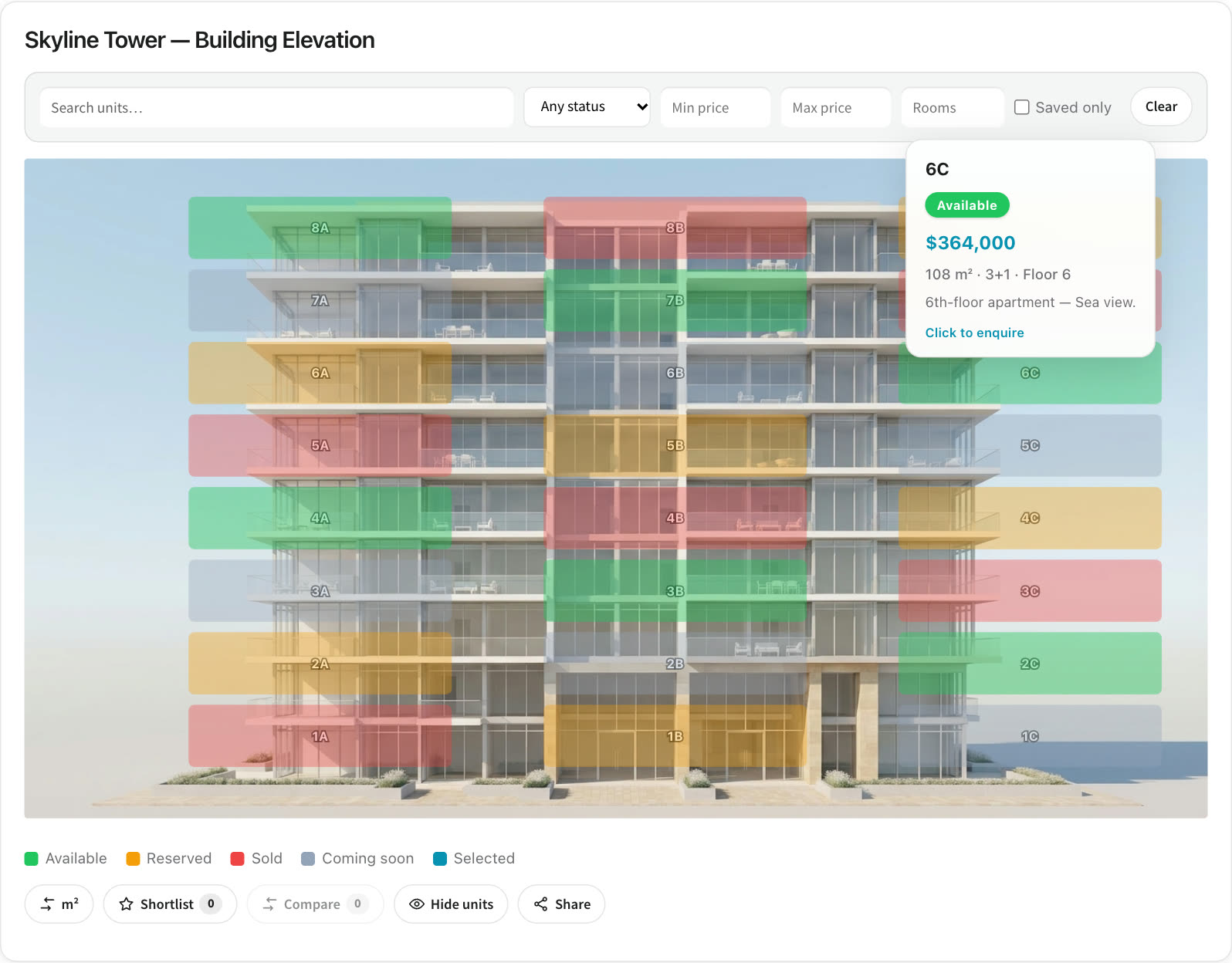
Select a unit to see its price, size and view. In the plugin, only available units open the enquiry form.
A simplified copy of the demo’s Skyline Tower plan: same units, statuses and prices. The real plan draws them over the building image.
See it run, start to finish
88 seconds, recorded on the live demo: a buyer filters the tower, opens a unit and books a viewing, then the plan builder and the enquiry that arrived. Pick a chapter to jump to it.
What a buyer does
The plan goes on any page with the FloorMap block or the [floor_map id="20"] shortcode.
Reads the plan
Every unit is coloured by status: available, reserved, sold or coming soon. Hover or tap shows the price, area, rooms, floor and a short description.
Narrows it down
Search, status, minimum and maximum price and rooms. Units outside the filter fade instead of disappearing, so the building still makes sense.
Shortlists and compares
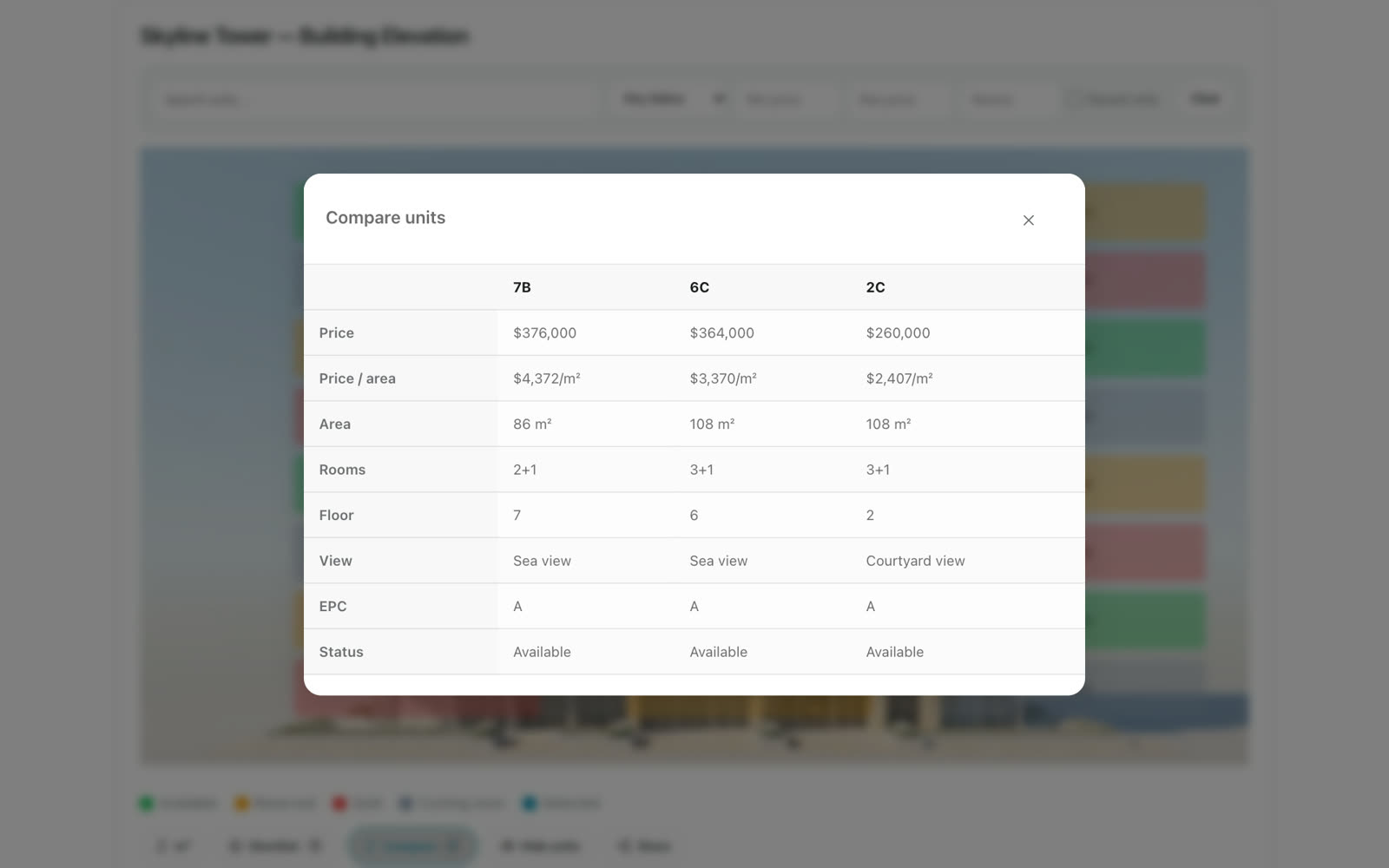
Saved units stay in the browser and can be shared as a link. Compare puts up to four side by side: price, price per area, area, rooms, floor, view, EPC and status.
Asks about one
An available unit opens its details and a form: an enquiry, or a viewing request with a preferred date and time. If you add a WhatsApp number, a WhatsApp button sits next to it.
The screens, as they are
Screenshots of the demo site. You can open the same plans, and log in to the same admin with the demo account below.
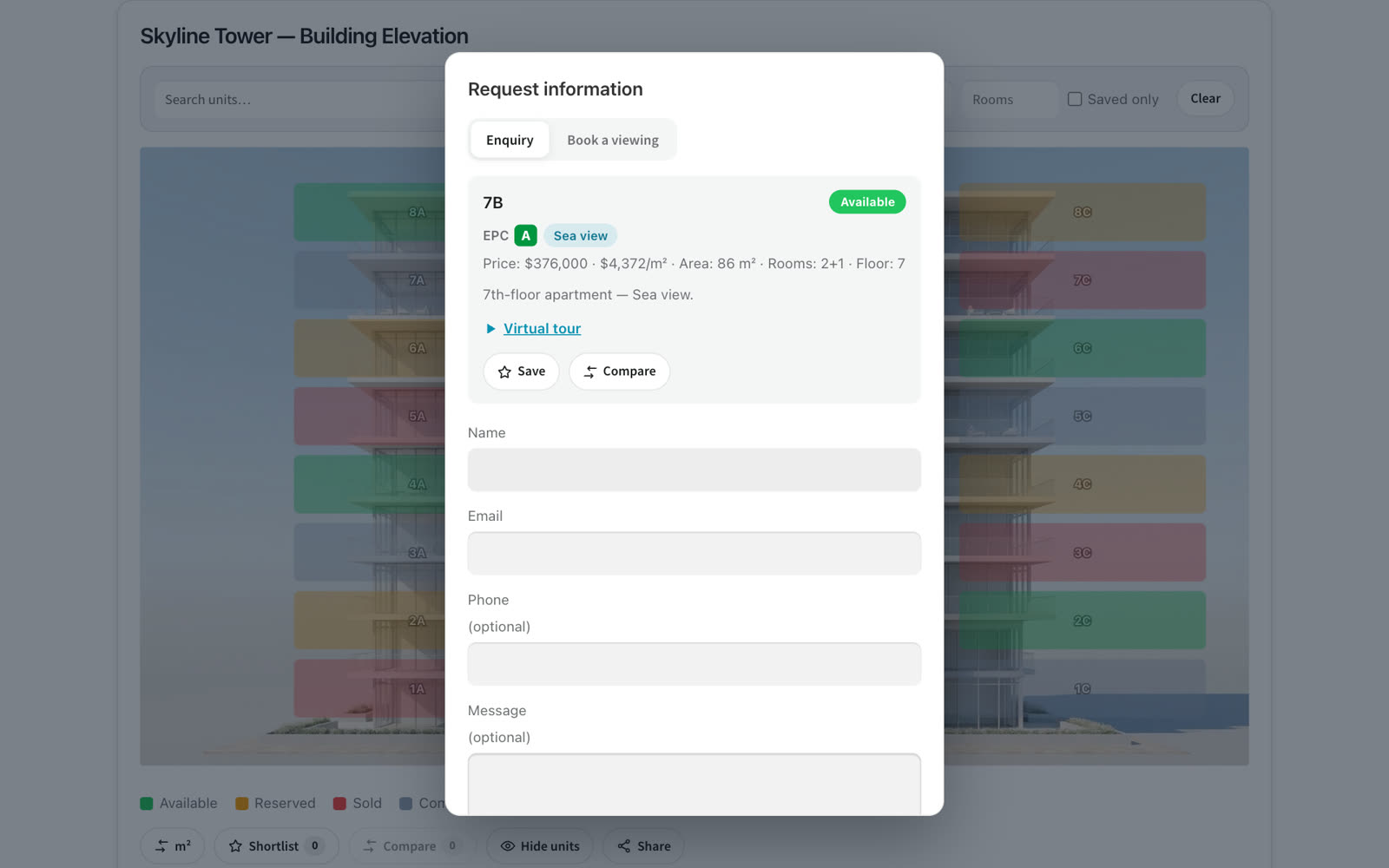
One unit, everything about it
Clicking an available unit opens its details above the form, so the buyer never loses sight of what they are asking about.
- Price, price per m² or sq ft, area, rooms, floor
- EPC badge (A–G) and view, when you fill them in
- Brochure and virtual-tour links
- Enquiry or viewing request, with a consent checkbox
Side by side
Buyers add units to compare from each unit’s panel, then open them in one table. Up to four at a time.
- Price and price per area
- Area, rooms, floor and view
- EPC and status
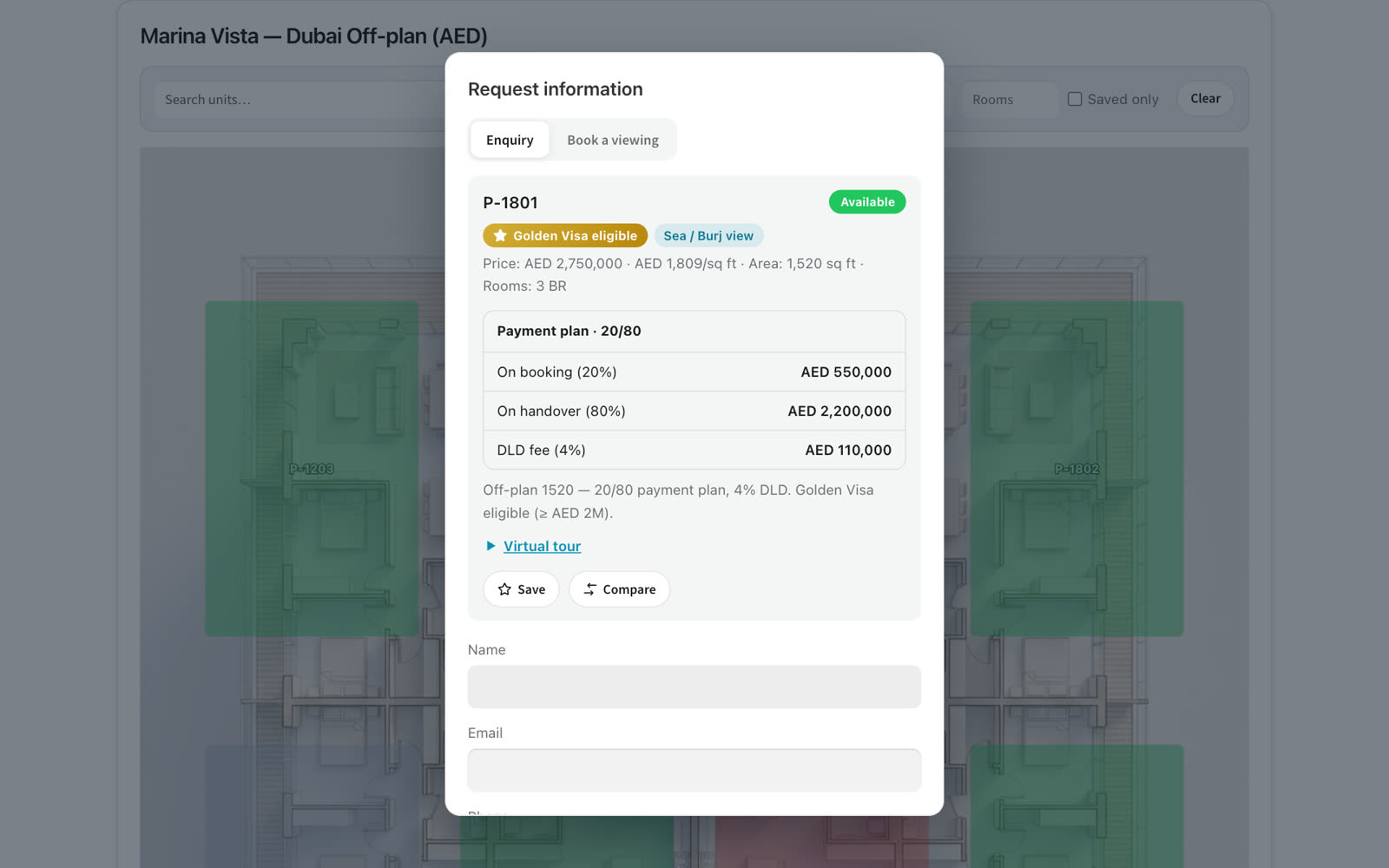
Selling before it’s built
Give a unit a split such as 20/80 and the panel works out the booking and handover amounts. Optional per unit: the 4% Dubai Land Department fee and a Golden Visa flag.
- Any split you type, like 60/40 or 10/90
- Golden Visa flag set per unit or from a price threshold
- Currency symbol and m² or sq ft set per plan
Draw units over your plan
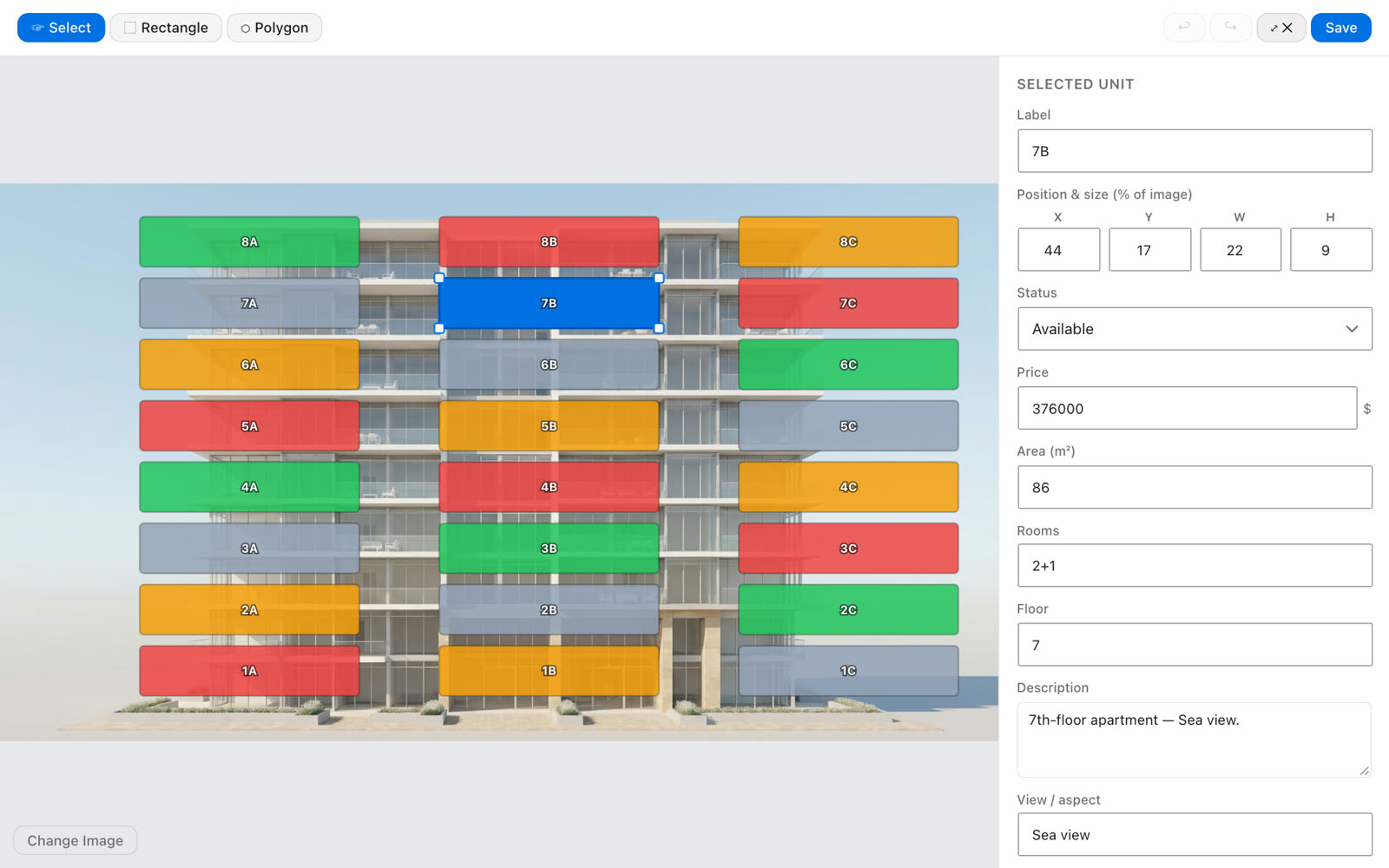
Upload the image, then drag out a rectangle or click the corners of a polygon. Select a unit to edit it in the panel on the right.
- Label, status, price, area, rooms, floor, description
- View, EPC, brochure, tour, payment plan, DLD, Golden Visa
- Undo, redo and full screen
- Positions stored as percentages, so the plan scales
Enquiries become a pipeline
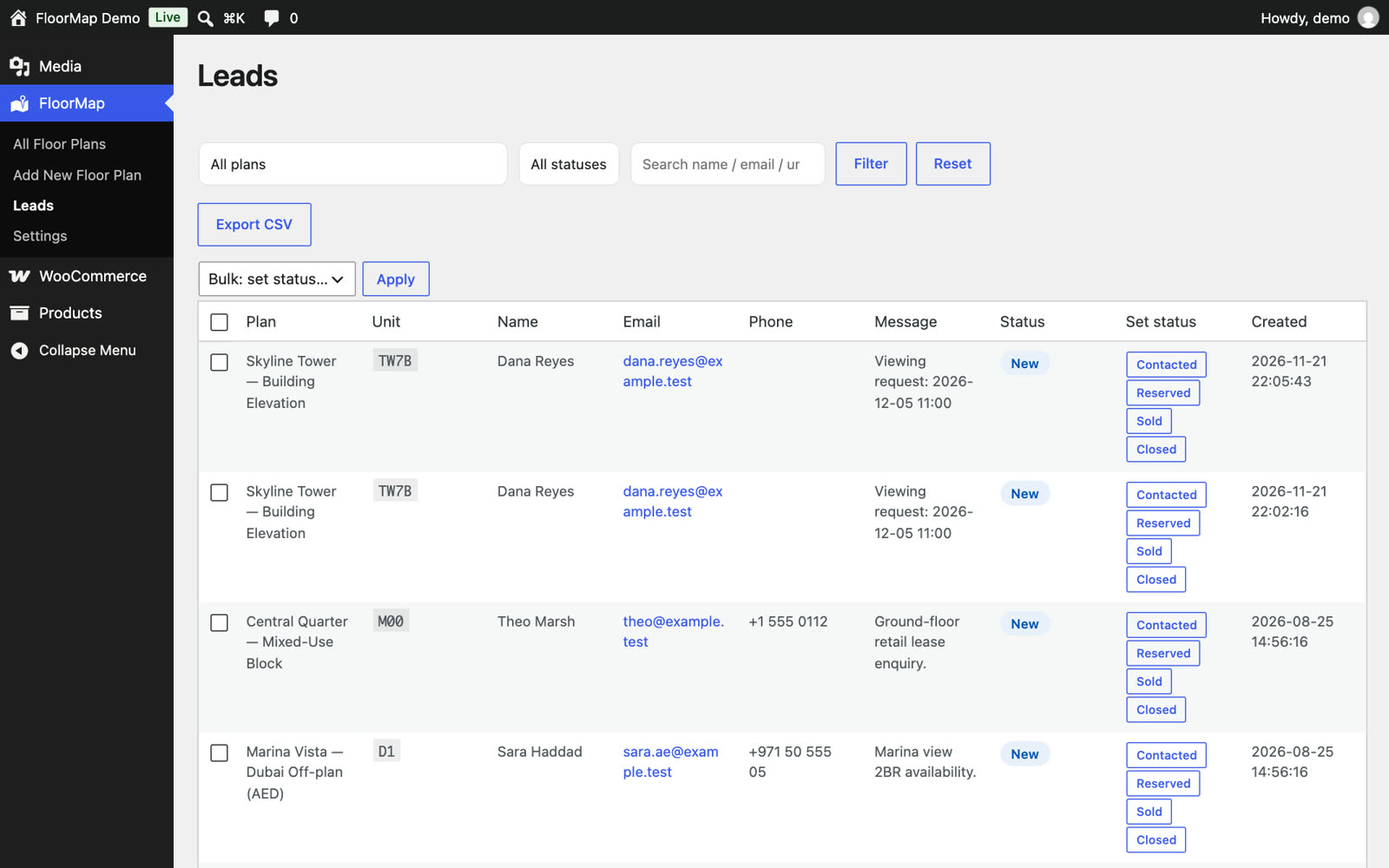
Every enquiry is saved with its plan and unit, and emailed to the site’s admin address. Move each one along as the sale progresses.
- New, contacted, reserved, sold, closed
- Filter by plan and status, search, bulk status
- Private notes per enquiry
- CSV export, guarded against spreadsheet formula injection
A few site-wide settings
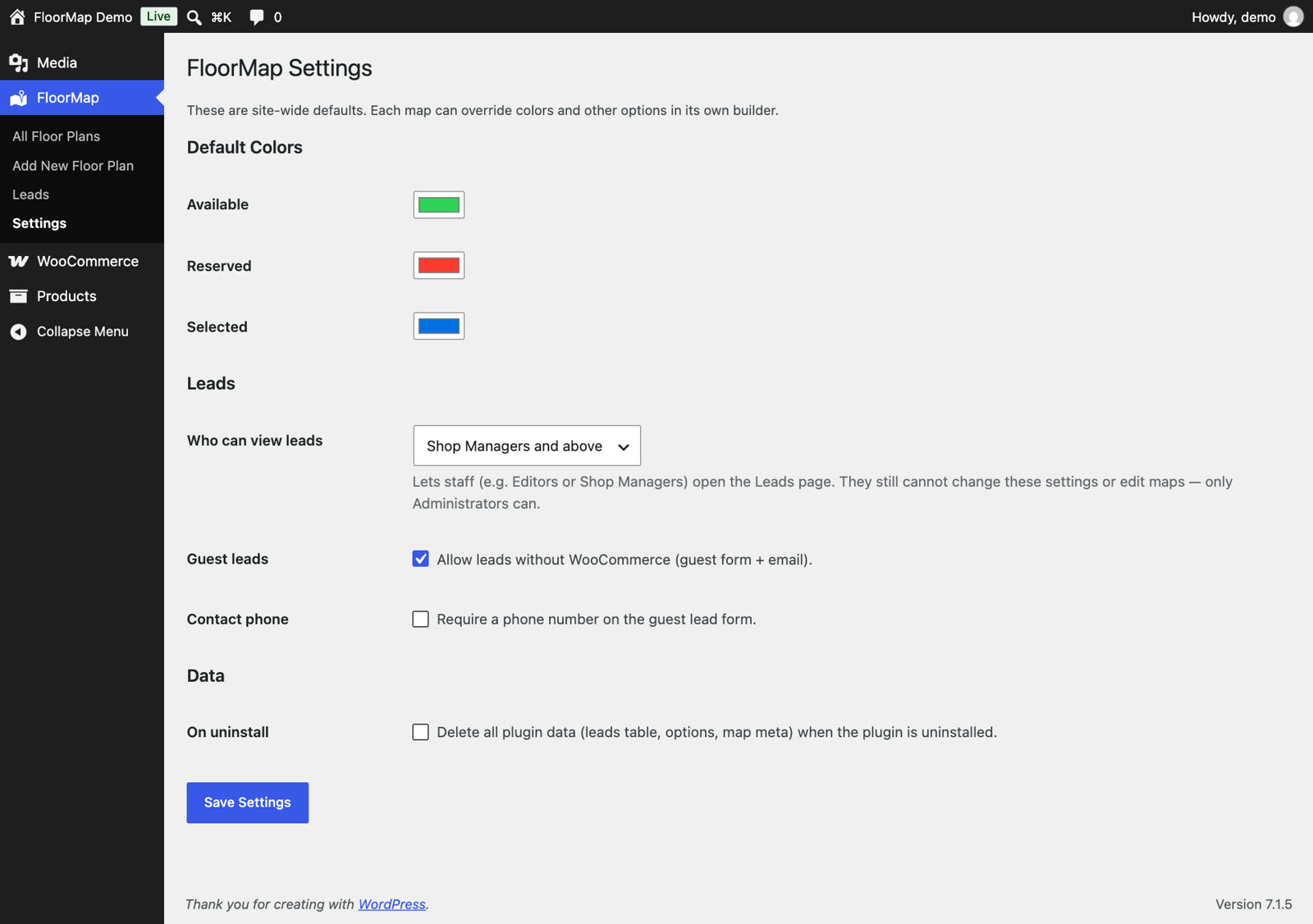
Each plan sets its own colours, currency and area unit in the builder.
- Who can open the Leads page, from administrators down to contributors
- Allow or turn off enquiries from visitors who aren’t logged in
- Make the phone number required
- Remove all plugin data on uninstall, if you want
Fields for the way each market lists property
All optional, per unit or per plan. Fill in what your listings need and leave the rest empty.
Metric listings
As on the Vienna demo.
- Area in m² and price per m²
- EPC energy class A–G as a coloured badge, with kWh/m² per year
- Euro or any currency symbol
Square-foot listings
As on the US new-homes demo.
- Area in sq ft and price per sq ft
- Buyers can switch m² and sq ft themselves
- Lots and homes on a site plan
Off-plan sales
As on the Dubai demo.
- Payment plan split with booking and handover amounts
- 4% DLD fee and Golden Visa flag
- WhatsApp button, and a mirrored layout on right-to-left sites
FloorMap shows the figures you enter. It doesn’t check them against any regulation, and prices are shown in one currency per plan, with no conversion.
Ten plans to try
All on one WordPress demo site. Filter, open units and send a test enquiry. Please use made-up details: the demo admin is shared.
- Admin
- /wp/wp-login.php
- Username
- demo
- Password
- FloorMapDemo!
The demo account can look at the builder, leads and settings, but it can’t save changes.
What’s in the plugin
Version 1.0.1, for WordPress 6.0+ and PHP 7.4+.
Any plan image
Elevations, floor plates, site plans and masterplans: any image from your media library. As many plans as you like, one per floor or building.
Four statuses
Available, reserved, sold and coming soon, each with its own colour. Change a status and the public plan updates on the next page load.
Block and shortcode
A FloorMap block for the block editor, and [floor_map id="…"] for everything else.
Phones and keyboards
A tap shows a unit’s details on touch screens, and available units can be reached with Tab and opened with Enter or Space.
Spam guards on the form
A hidden honeypot field, five enquiries per visitor per ten minutes, email validation, and a check that the unit really belongs to the plan.
Translatable, right to left
Every string goes through WordPress translation, a .pot file is included, and the plan mirrors on right-to-left sites.
What it doesn’t do
So you know before you buy, not after.
- No payments or reservations. It captures the enquiry and stops there. Your sales team takes it from there.
- No floor switcher inside the map. Each floor or building is its own plan; put them on one page or link between them.
- No currency conversion. Each plan shows one currency symbol.
- It isn’t a CRM. The pipeline covers five statuses and exports to CSV for the tool you already use.
- It doesn’t read shapes out of an SVG. An SVG works as the background; you still draw the units.
One price, no subscription
Bought from our own store. Paddle is the merchant of record: it issues the invoice, handles VAT and processes refunds. The licence key and download link arrive by email.
Read the licence terms, the refund policy and the documentation first, if you like.
- 1 WordPress site
- 1 year of updates and email support
- Keeps working after that; renew only for new versions
- Full GPL source, runs on your own server
- 30-day refund policy
Questions before buying: support@webkoding.com
Questions
Can somebody buy a flat through it?
No, and that is deliberate. FloorMap has no cart and no payment. It captures the enquiry or viewing request so nothing is committed by accident, and your sales team follows up.
Does it need WooCommerce?
No. Plain WordPress is enough.
Where do enquiries go?
Into the Leads page in your WordPress admin, and by email to the site’s admin email address, or to a different address you set for that plan. That address stays private: it is never part of the public plan. A viewing request is saved with the preferred date and time in its message.
How do I mark the units on my plan?
In the builder, over the image: pick Rectangle or Polygon and draw. A polygon is a series of clicks, closed with a double-click or Enter. Then fill in the unit’s fields. No coordinates and no code.
Does it work with several floors or buildings?
One plan per floor or building, each placed with its own block or shortcode. An elevation like the Skyline Tower demo shows a whole building on one plan. Every unit also carries a floor number.
Is there a limit on units or plans?
No. One licence covers one site, with as many plans and units as you need.
Can I show m² or sq ft, euros or dirhams?
Yes, per plan: set the area unit and the currency symbol. Buyers can switch between m² and sq ft on the plan. There is no currency conversion.
Can staff who aren’t administrators work the leads?
Yes. In Settings, choose who can open the Leads page: administrators only, or editors, authors or contributors and above (and shop managers, if WooCommerce is installed). Editing plans and settings stays with administrators.
Put your plan to work
Try the tower in the demo, then put your own plan on your site.